

Score from 0 to 100
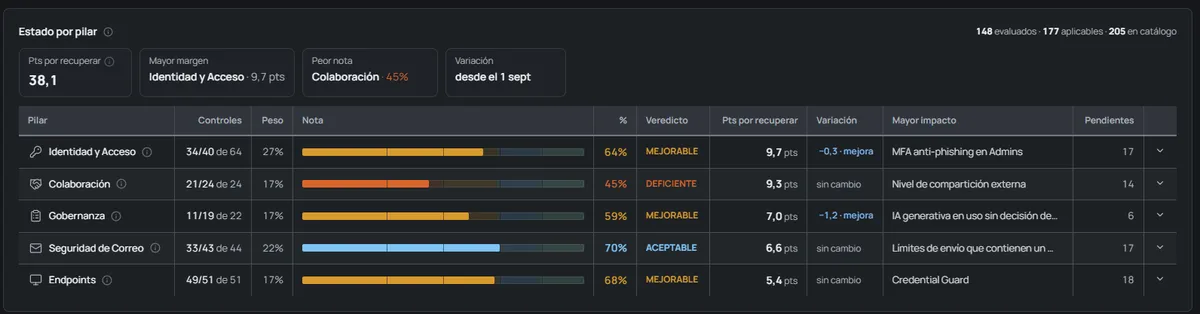
Five published bands and a control-by-control breakdown: every point traces back to a specific indicator. The methodology is public and versioned, and each audit records which version produced it.
OKAudit365
OKAudit365 reads your tenant in read-only mode and returns a score traceable control by control, the mapping to ISO 27001, ENS and GDPR, and signed evidence anyone can verify.
More than 200 security controls · No agents, no installation · Data held in Spain
The problem
The Microsoft portal shows the tenant status, but does not produce verifiable evidence.
Governance tools focus on SharePoint and Teams and leave identity, email and endpoints out.
A consultancy report in a spreadsheet gives no way to verify, six months later, what was checked or how.
OKAudit365 closes that gap: a score traced control by control and evidence sealed cryptographically.
Deliverables
Material ready to hand to your board, to a client or to an auditor.
Five published bands and a control-by-control breakdown: every point traces back to a specific indicator. The methodology is public and versioned, and each audit records which version produced it.
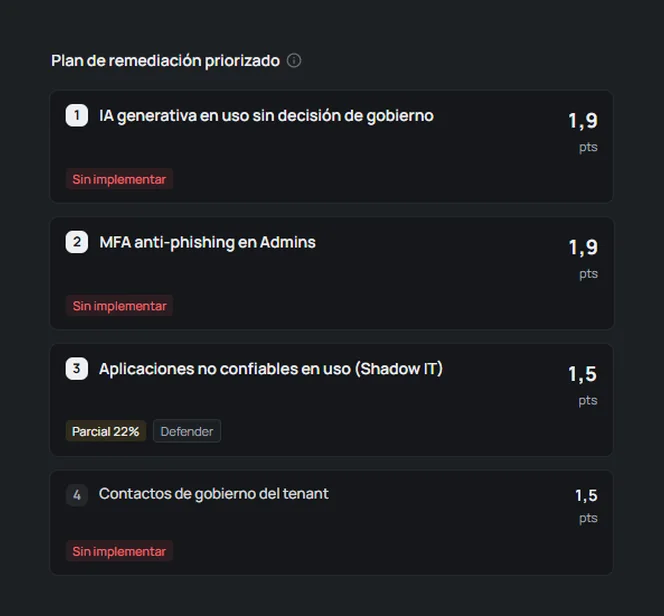
Ordered by the points each action recovers. Every action states which console it is applied in — Entra ID, Exchange, Intune, Defender or Purview — and how much the score rises.
ISO/IEC 27001 (Annex A), ENS (Spanish RD 311/2022) and GDPR, with the scope limit declared on each control.
Two formats, executive and detailed, with the cryptographic fingerprint printed on the cover. Control-by-control CSV export and evidence package.
Every audit is sealed with SHA-256. Delivered reports and snapshots keep their evidence and can be re-verified to prove they have not been altered.
Score evolution between scans, with methodology changes flagged to tell them apart from real changes in the tenant. Daily, weekly or monthly cadence, unattended.
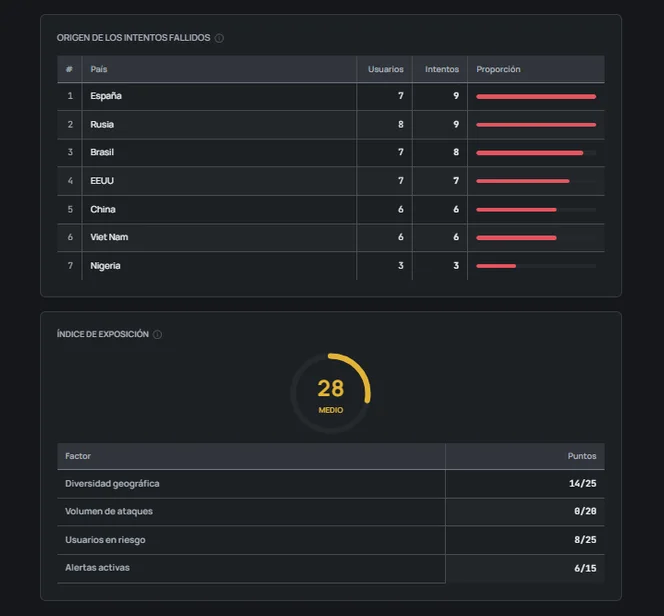
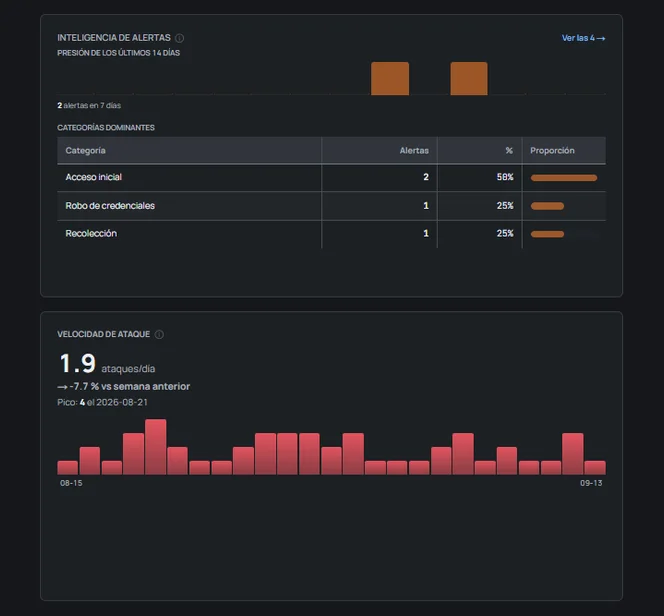
The audit findings broken down by criticality, and the ISO/IEC 27001, ENS and GDPR articles they affect. Coverage shows how many controls could be assessed out of those applicable to the tenant, and how many do not apply.
Getting started
No server installation, no agents on devices, no service accounts and no global administrator.
You open an admin consent URL and approve the application. A single click.
The platform checks which modules are operational in your tenant and which need an additional permission.
It starts once the permissions have finished propagating in the tenant, which can take several hours. When it finishes there is a score, findings, a remediation plan and a downloadable report.
You set the audit cadence and subsequent scans run unattended.
Coverage
More than 200 security controls read from the Microsoft Graph API in read-only mode, organised into five pillars weighted by their impact on risk. Efficiency is scored separately, with its own set of controls.
How the method is calibrated
The method is our own and is calibrated against three external references, each with a date and a written rule: the Microsoft Secure Score, the CIS Microsoft 365 Foundations Benchmark as a weight floor, and public incident evidence (Verizon DBIR and the Microsoft Digital Defense Report) for how weight is distributed across pillars.
MFA and its quality — phishing-resistant versus SMS —, conditional access and its gaps, global administrators, PIM, unprotected privileged accounts, legacy authentication and inactive accounts.
EOP anti-phishing and anti-spam, transport rules that bypass the filter, automatic forwarding to external domains, SPF, DKIM and DMARC per domain, and third-party applications with mailbox access.
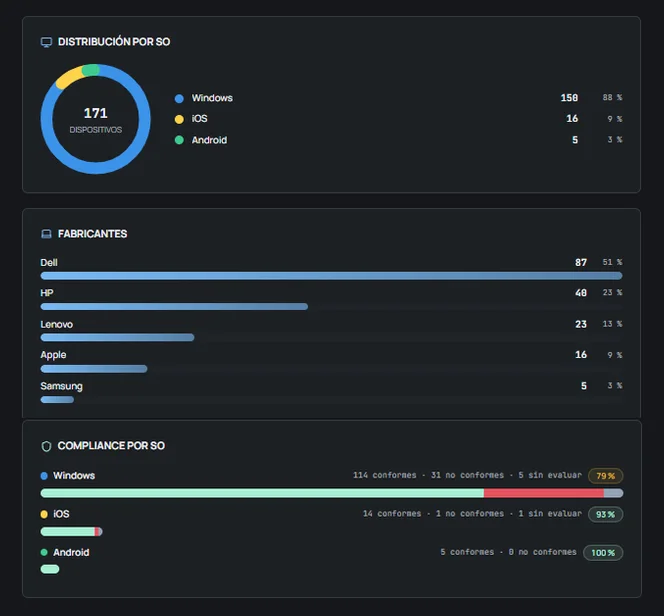
Intune compliance, disk encryption, operating system lifecycle — devices out of support on Windows 10 and 11 —, update rings, real enforcement of compliance policies and Defender hardening settings, with the detail of which devices fail.
External sharing in SharePoint and OneDrive, anonymous links, guests and their activity, and orphaned sites.
OAuth applications with permissions over data, expired secrets and certificates, the audit log, the effective quality of policies and Shadow IT.
Cost, licensing and adoption have their own score and play no part in the security score. Mixing spend with posture would distort both.
It tells phishing-resistant methods apart from those an attacker can bypass, and measures how far the tenant is from full coverage.
They widen the evidence if the client enables them. If a module is not enabled, its sections are declared unavailable with the reason: it never subtracts points and is never read as non-compliance.
With Defender for Cloud Apps the real traffic from devices is measured: which third-party services receive data, how many gigabytes leave and what share goes to generative AI services. The measurement comes from the devices’ network traffic.
Access security
36 permissions, all read-only. The answers the security committee will ask for, provided up front.
OKAudit365 access diagram: it reads Entra ID, Exchange Online, SharePoint and OneDrive, Intune and Defender in read-only mode, processes the data in Azure Spain Central and produces a report with sealed evidence. It has no write permission on the tenant.
Pick a service
You will see what OKAudit365 reads in it and with which exact permission. They are the same names shown in your Entra ID when you review the consent.
Entra ID
What it reads
Users, groups and roles, PIM assignments, registered MFA methods, Conditional Access policies, sign-ins from the last 30 days and users at risk.
Permissions
Exchange Online
What it reads
Forwarding rules and automatic replies on every mailbox. With the Exchange module, also transport rules and anti-spam, anti-phishing and anti-malware policies.
Exchange.ManageAsApp only opens the connection: what can be done is limited by the Global Reader role, which only allows queries. Mail content is never read.
Permissions
SharePoint and OneDrive
What it reads
Tenant external sharing settings and a site inventory with file metadata: size, versions and activity.
Sites.Read.All would allow reading file content. The connector does not download it: it only queries metadata.
Permissions
Intune
What it reads
Managed device inventory, encryption and compliance status, and the configured compliance policies.
Permissions
Defender
What it reads
Security alerts and Secure Score. With the Defender for Endpoint module, the device inventory and the pending security settings on each device.
Permissions
No write permission over the tenant. It modifies nothing and deletes nothing.
It reads configuration, metadata and security signals. Never message bodies, files or Teams conversations.
No service accounts either. The Exchange module uses a certificate with a read-only role.
Azure, Spain Central region. Processing and storage in Spain, with a dedicated container per client.
The list is audited against the code and delivered justified at onboarding. If a permission stops being used, it is removed.
The consent is recorded in your Entra ID: the 36 permissions can be reviewed there and removed from Enterprise applications, with no action needed from us.
Method honesty
A report is only useful if whoever signs it can defend it. These rules live inside the product.
If a data point cannot be read, the control is skipped rather than inventing a result. Absence of findings is never presented as compliance.
Capabilities that depend on licensing — Entra ID P1 and P2, Intune, Purview — do not penalise if you have not purchased them.
The report states how much of the catalogue could be evaluated in your tenant. A control that does not apply, because the service is not licensed or not in use, neither counts as non-compliance nor inflates the score: it is removed from the calculation and declared.
If a collection is truncated by volume, it is flagged as partial.
When a data point allows two legitimate readings, it is flagged for manual review instead of picking the worst one.
The mapping to the CIS Microsoft 365 Foundations Benchmark covers part of the catalogue and is declared control by control: it cites the topic and level of each equivalent recommendation, without reproducing its text.
Limits
The limits of the scope, declared up front.
OKAudit365 shows controls with evidence for and against. Certifying is the job of an accredited body.
It audits and produces evidence. It is not an antivirus, an EDR or a firewall: it does not stop an attack in progress.
The scope is the tenant. Whatever happens on your local network, your servers or other clouds is out of scope.
Options
A project with a beginning and an end, or a continuous service. The platform is the same in both cases.
Project
For a specific need: preparing an ISO 27001 or ENS audit, answering a client, or learning the real state of the tenant.
Continuous service
To stay in control over time: every change in the tenant shows up in the next scan and remediation is verified.
The price is set by the tenant’s user band and is communicated in the proposal. Remediation work and derived projects are quoted separately.
No. Onboarding uses an admin consent URL that approves the application in read-only mode. No service accounts are created. The Exchange module, if enabled, uses a certificate with a read-only role.
No. OKAudit365 holds no write permission: it modifies nothing, deletes nothing, and installs no agents or software on devices. Users do not notice the scan.
Controls that depend on those licences do not penalise. Their sections are declared unavailable stating the reason, and the score is calculated on what can actually be evaluated.
The report and the evidence package are yours, and the remediation plan can be executed by your own team. If you prefer us to implement it, we quote from the plan itself, with the scope closed before starting.
Tell us the size of your organisation and we will send the proposal and next steps within one business day.